Edit your app in the browser.
Let your agent write the code.
Point at any element, tweak it, and hand your agent a JSON diff it can actually apply.
pnpm add -D @guerrerosoconm/visual-editor- dependencies
- 0
- licence
- MIT
- version
- v0.4.0
- hosts
- React, Vue, Angular, vanilla
Four steps, and none of them is describing the change in a prompt.
Pointing is faster than writing a paragraph about what you were pointing at. The editor's whole job is turning a point into something an agent can act on without guessing.
-
1
Hover
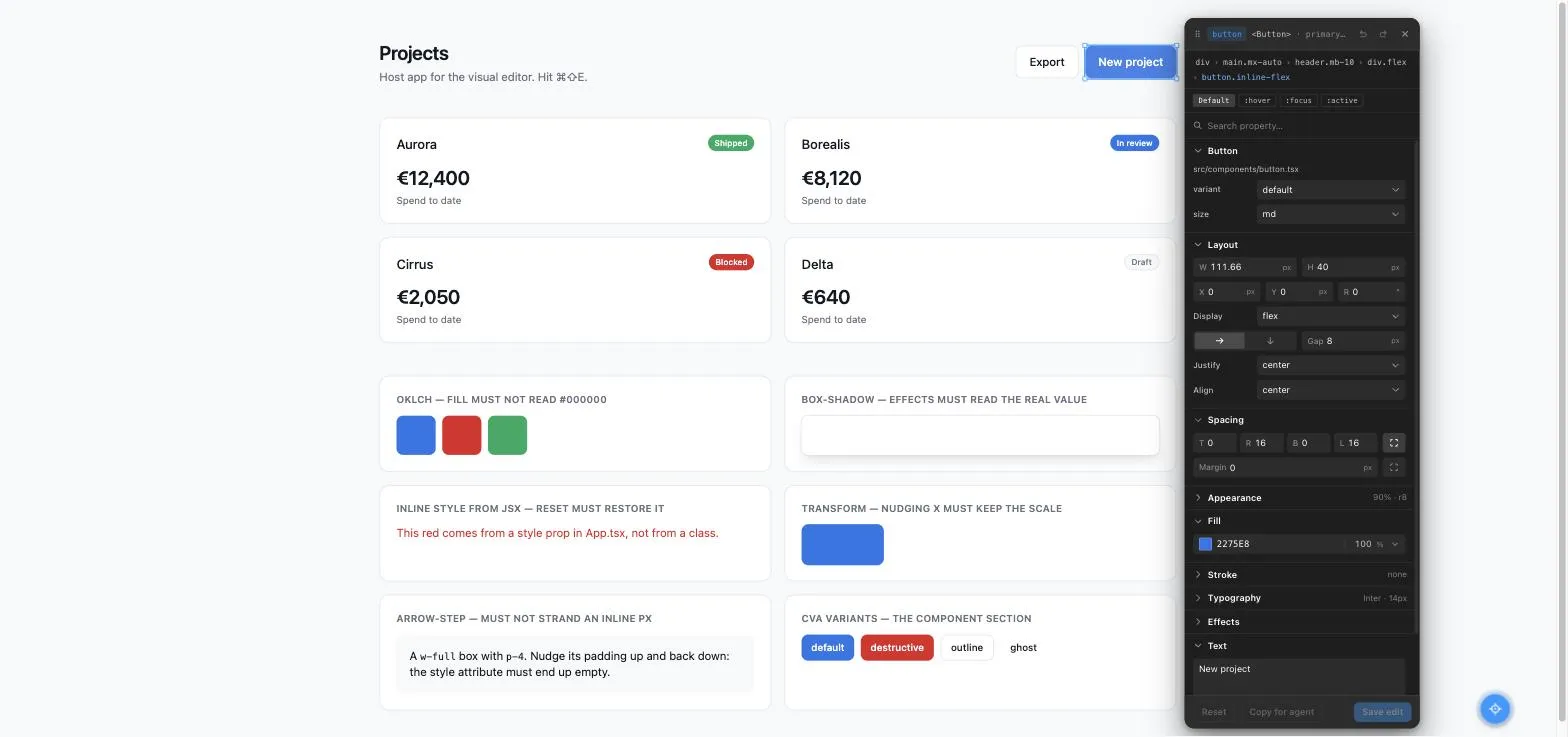
Every element highlights with its tag, its component and its size. Walk the tree with the arrow keys when the thing you want is three divs up.
-
2
Tweak
Click, and the panel opens. Spacing, fill, stroke, type, shadows, hover states. Changes preview as inline styles, so nothing is committed yet.
-
3
Save
Every touched element is written to edits.json with the before, the after, and enough anchors to find the JSX that produced it.
-
4
Hand it over
Your agent reads the file, finds the source, and writes the change in your styling system. Tailwind, CSS modules, whatever you actually use.
It boots from one call in anything.
The editor injects its own styles, paints into its own root and reads nothing from the host. What changes between frameworks is only how much of what it finds it can put a name to.
| host | component names in the payload | live props read for the variant edit | class, testid and selector anchors | source stamping |
|---|---|---|---|---|
| React | yes | yes a | yes | yes |
| Vue 3 | yes | yes a | yes | no b |
| Angular | yes | yes a | yes | no b |
| Svelte, Solid, plain HTML | no | no | yes | partial c |
The payload is complete on every row. Only the naming layer varies: without component names an agent gets the class, the test id, the selector and, on JSX, the file and line. That is still the whole address.
| host | edits.json on disk | component manifest | how you get the batch |
|---|---|---|---|
| Next.js App Router | yes | yes | written on save |
| Remix | yes | yes | written on save |
| Hono | yes | yes | written on save |
| Astro | yes | yes | written on save |
| plain Node | yes | yes | written on save |
| no backend at all | no | no | console [AI-EDIT-REQUEST], or Copy JSON |
- a
- Read from dev-build internals to seed the Component dropdowns. It reaches the payload as component.props, which needs a cva or tv manifest, or one you supply.
- b
- The plugin's default include is /\.[jt]sx$/ and it parses JSX, so a .vue single-file component and an Angular template are not stamped. Everything else on the row is unaffected.
- c
- The stamper is framework-blind: it rewrites any lowercase host tag in a .jsx or .tsx file, so a Solid app gets stamps. A .svelte file or a hand-written .html page gets none.
import { mountVisualEditor } from '@guerrerosoconm/visual-editor/standalone';

if (import.meta.env.DEV) mountVisualEditor();
The server adapter returns Web-standard Request to Response handlers, so Next.js App Router, Remix, Hono, Astro and plain Node all work from the same three exports.
A truer payload beats a richer panel.
Anyone can capture a pile of computed pixels. The difference between an agent that applies your change and one that guesses at it is whether the JSON carried the intent or only the fallout.
"styles": {
  "background-color": {
    "before": "rgb(15, 23, 42)",
    "after":  "rgb(239, 68, 68)"
  },
  "color": {
    "before": "rgb(248, 250, 252)",
    "after":  "rgb(255, 255, 255)"
  }
}"component": {
"name": "Button",
"file": "components/ui/button.tsx",
"props": {
"variant": {
"before": "default",
"after": "destructive"
}
}
}
You get that second shape when your components use cva. The server scans them, the panel gets real variant and size dropdowns, and switching one swaps the actual classes on the element. A genuine variant, not a CSS impression of one.
Stop making the agent search for your JSX.
Add the Vite plugin and every element carries the file, line and column of its own tag. The agent stops grepping and starts being handed the answer.
Dev-only structurally: the plugin declares apply: 'serve', so a production build never runs it whatever your config says. Still zero dependencies, because it parses with the TypeScript already in your project, loaded lazily. And nothing regresses without it. The payload anchors on component ancestry and class names exactly as before.
import { visualEditorSource } from '@guerrerosoconm/visual-editor/vite';

export default defineConfig({
  // Before react(): the JSX has to still be there to be stamped.
  plugins: [visualEditorSource(), react()],
});"source": "src/components/Button.tsx:42:7"One saved element, every field, and what it buys your agent.
This is the artefact the whole tool exists to produce, complete and not trimmed for the page. Point at any group of fields to see the lines it owns, or at a line to see what it is for.
The panel exists to make three things sayable.
Layout, spacing, appearance, fill, stroke, type and effects, as you would expect from any editor. These three are the ones that change what the payload can carry.
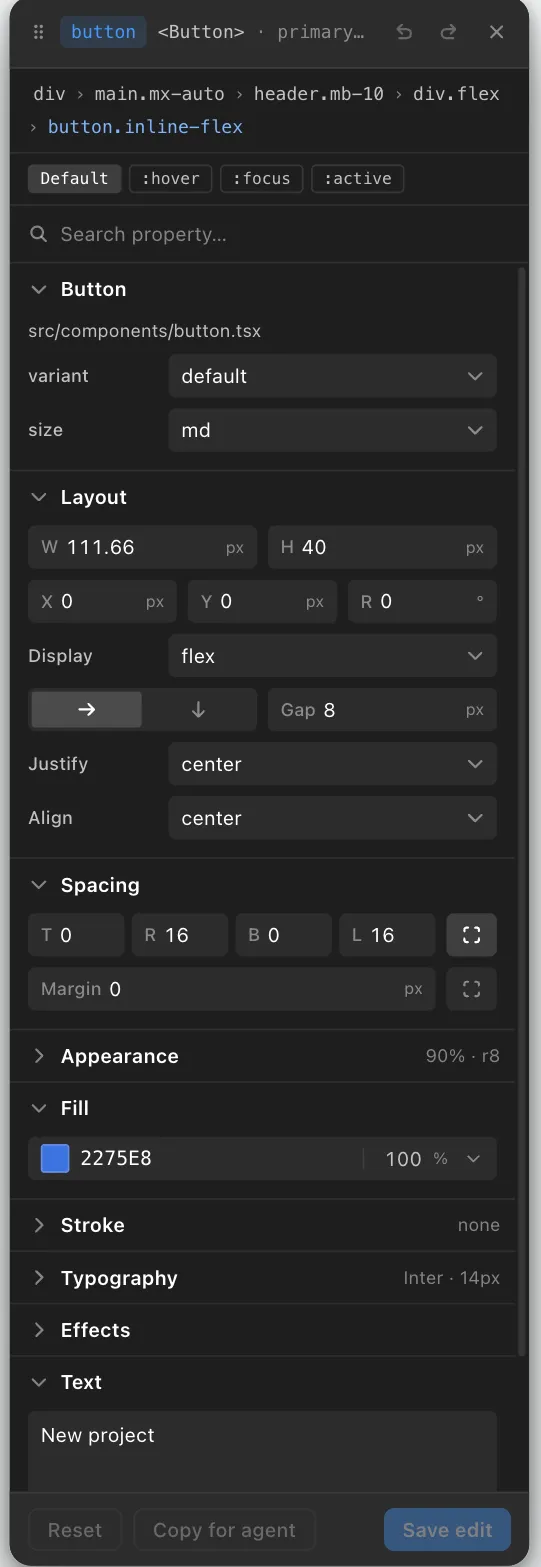
- one panel per state: hover, focus, active
- these are real cva variants, not class guesses
- Save edit writes the entry to edits.json
State tabs
Default, :hover, :focus and :active. Edit with one selected and it exports under states.hover rather than styles. A hover style used to be unsayable.
"states": { "hover": { "background-color": "rgb(29, 78, 216)" } }
Undo that tells the truth
Page-wide and in the order you did things, so undoing something on another element selects it and shows you. Saving does not clear the history, and undo never reaches into edits.json.
the element goes dirty again, which is what actually happened
Notes, pinned
Leave the agent a message about why. Every element carrying one gets a numbered pin on the page, because a note is the one edit that changes nothing visually.
"note": "Match the spacing scale we use on the hero CTA."
Three steps and you are editing.
pnpm add -D @guerrerosoconm/visual-editor// app/layout.tsx
import { VisualEditor } from '@guerrerosoconm/visual-editor';
export default function RootLayout({ children }) {
return (
<html><body>
{children}
{process.env.NODE_ENV === 'development' && <VisualEditor />}
</body></html>
);
}// app/api/dev/visual-edits/route.ts
import { createVisualEditsHandlers } from '@guerrerosoconm/visual-editor/server';
export const { GET, POST, DELETE } = createVisualEditsHandlers();
The NODE_ENV guard is what keeps the editor out of your production bundle, and the endpoint 404s outside development. Do not skip it. Add edits.json to your .gitignore while you are there.
Read edits.json. For each edit, locate the element in the source using
source (when present), className, testId and componentStack, translate the
style values into our Tailwind classes, apply the changes, including any
states.hover / states.focus / states.active as the hover:/focus:/active:
variants, then clear the file.The questions that decide it.
Does this ship to production?
Only if you mount it unconditionally, which you should not. The endpoint independently 404s outside development.
Does it modify my source?
No. It writes edits.json and nothing else. Your agent makes the code changes, and you review that diff like any other.
Why do I get pixels instead of my Tailwind classes?
Because the browser only knows computed values. That is why every diff carries before, so the agent maps before: 12px to the p-3 in your JSX and picks the right target class.
I do not use cva. Does component detection still work?
The Component section simply does not appear, and everything else works. You can also supply the manifest yourself. Check the console first: every definition the scanner had to drop is logged there with the file and the reason.
My edits disappeared.
Closing the editor discards what you did not save, but it asks first, and so does the browser if you reload with anything pending. A full page reload does clear everything, deliberately: after your agent edits the source, the page should show the source.
What does it cost?
Nothing. MIT, zero runtime dependencies, no account and no telemetry. React and react-dom are peers, nothing else.
- 0 runtime dependencies react and react-dom as peers
- MIT licence yours to fork
- none telemetry no account, no external host
Built and maintained by Marcos Guerreros Ocón. One person, in the open.